
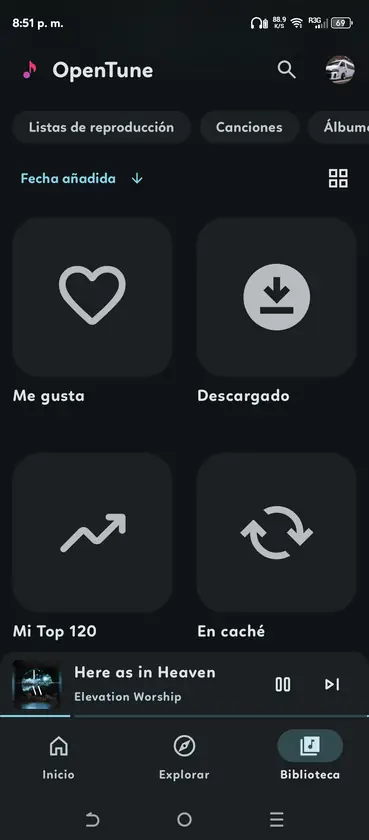
Is OpenTune available as a native Linux app?
No native Linux release is listed in the main OpenTune repository. The current stable download is an Android package, and the codebase targets Android SDK APIs. That means package managers should not be expected to find an official opentune DEB, RPM, AppImage, Snap or Flatpak.
A Linux download page that offers one of those formats should identify its source and build process. If it cannot be traced to Arturo254/OpenTune or a clearly documented community build, do not treat it as the official application.
- Official release format: APK.
- Minimum Android API for 3.0.6: 26.
- Native Linux package: not published.
- Recommended experimental route: a supported Android environment such as Waydroid.
What Waydroid needs
Waydroid integrates an Android container with a Linux desktop. Compatibility varies by distribution, kernel modules, Wayland session and graphics hardware. Check Waydroid's official documentation for your distribution rather than copying a command written for a different package manager.
A working Wayland session is the most straightforward environment. X11-only setups may need additional configuration. Audio normally passes through the Linux sound stack, but Bluetooth switching and media controls can behave differently from a phone.
| Requirement | Why it matters | Check before installing |
|---|---|---|
| Supported Linux distribution | Provides Waydroid packages and services | Use the official Waydroid installation page |
| Compatible kernel | Supports Android container requirements | Confirm binder support for your distribution |
| Wayland session | Integrates Android windows with the desktop | Check the current desktop session |
| Working graphics stack | Renders the Android UI and video | Update Mesa or vendor drivers when appropriate |
| Internet and audio | Streams music and outputs sound | Test DNS, PulseAudio or PipeWire first |
How to install the OpenTune APK in Waydroid
Install and initialize Waydroid using its official distribution-specific steps first. Once the Android session opens normally, use Waydroid's application installation command with the verified OpenTune APK. Keeping those two phases separate makes troubleshooting clearer.
- Install Waydroid
Follow the official instructions for your Linux distribution, initialize the Android image and start the container service.
- Launch the Android session
Confirm that the Waydroid interface opens, networking works and another simple Android application can run.
- Download OpenTune
Get the current universal APK from the official GitHub Release through the download section on this site.
- Verify the file
Compare the filename, version, file size and SHA-256 with the release facts before sideloading.
- Install the APK
Use the Waydroid app install command with the local APK path, then launch OpenTune from the Android application menu.
- Test playback
Check audio output, WebView login, downloads and background playback before investing time in customization.
Expected Linux limitations
OpenTune depends on Android services and upstream music endpoints. Waydroid images without Google components may have different login behavior, although OpenTune itself is not a Google Play package. WebView versions, certificate stores and network filters can affect authentication and content requests.
Downloaded tracks and application files live inside the Waydroid container. Back up the relevant Android data before resetting or replacing the container. A Linux home-directory backup does not automatically guarantee that the container image can be restored cleanly.
Hardware media keys, MPRIS integration, Bluetooth output changes, notifications and background restrictions can require desktop-specific workarounds. If native Linux integration is more important than the OpenTune interface, a Linux-native music client may be the more reliable choice.
- No official Linux desktop integration.
- Container storage is separate from normal music folders.
- Account login can depend on Android WebView and image configuration.
- Audio and media-key behavior varies by desktop environment.
- Waydroid updates and OpenTune updates are separate tasks.
Troubleshoot OpenTune on Linux
When OpenTune on Linux does not start, test the Waydroid session before reinstalling the APK. Confirm that the container service is running, the Android interface opens and a simple Android application launches. A stopped container, unsupported kernel configuration or broken graphics session cannot be repaired by downloading a different OpenTune package.
For connection or sign-in errors, open a normal page in the Waydroid browser and check the Android System WebView version. Host DNS filters, VPN routes, certificate tools and restrictive firewalls can affect the container differently from native Linux applications. Compare a temporary unfiltered connection only as a diagnostic step, then restore the privacy and network controls you actually need.
If playback works but no sound reaches the speakers, check Android media volume, the Waydroid audio route and the host PipeWire or PulseAudio device in that order. Bluetooth output changes may not propagate into a running container immediately. Restarting only the Android session is safer than resetting the entire container and losing application data.
Storage errors require checking both sides of the container. OpenTune reports Android storage, while the Waydroid image consumes space on the Linux filesystem. Keep free host space for the image to grow, and identify container backup procedures before clearing data. Offline tracks should not be treated as normal files in the Music directory unless you explicitly export them.
- Verify the Waydroid container and session are running.
- Test network access and WebView inside Android.
- Check Android volume before changing the Linux sound server.
- Confirm free space in both Android and the host filesystem.
- Keep Waydroid and OpenTune update procedures separate.
| Symptom | Likely layer | First action |
|---|---|---|
| App will not open | Waydroid service or graphics | Launch another Android app and inspect the container |
| Blank login window | WebView, DNS or certificates | Update WebView and test container networking |
| Playback is silent | Android or host audio route | Check media volume and current PipeWire/PulseAudio output |
| Downloads stop | Container or host storage | Check free space on both filesystems |
| Background playback ends | Android lifecycle restrictions | Review battery and background settings in Waydroid |
Official sources
- OpenTune GitHub repository - Official Android source and APK releases.
- Waydroid documentation - Installation, usage and distribution-specific guidance.
- OpenTune latest releases - Stable APK files and release notes.
OpenTune on Linux FAQ
Is there an OpenTune AppImage or Flatpak?
No official AppImage or Flatpak is published in the current OpenTune repository. The supported application is an Android APK.
Does OpenTune work in Waydroid?
It can run when Waydroid, networking, Android WebView and audio are working on the host system. Compatibility is not guaranteed by the OpenTune project for every Linux setup.
Where are OpenTune downloads stored on Linux?
They are stored inside Waydroid's Android data environment unless you explicitly export or share files.
Can I use OpenTune on an X11 desktop?
Waydroid works most naturally with Wayland. X11 configurations may require additional desktop-specific workarounds.
Should I install an OpenTune DEB from another site?
Only when the publisher documents the source, build process and signature. The official project currently distributes an APK, not a DEB.